
|
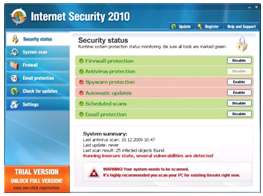
Digital News Report – Every year fraudulent websites trick users into thinking they have viruses and other malware on their computer, and then convince them to buy their virus removal software. The year 2010 is shaping up to be the same.
This year the first reported scam is called “Internet Security 2010”. The malicious website displays a fake claim that your computer is infected and coerces the user into purchasing and using the software. Once the user does that they are annoyed with pop-ups and fake alerts.
Since the virus is new, there has been confusion on how to get rid of it.
Here is how to get rid of it:
- Restart your computer and hit F8 once it begins the booting process. Keep hitting F8 until you see a menu.
- Select run Windows in Safe Mode with Networking from the menu.
- There are various software programs you can use to get rid of this virus. Here are a couple companies that claim they can remove the threat:
1) Malwarebytes
2) Spyware Doctor
- Go ahead and download the program and install it. You will need to run it in safe mode to permanently remove the Internet Security 2010 malware.
Good luck.
By: Sam Lee
I reinstalled the operating system in order to unlock the computer, because the virus locked it up. As a result, of reinstalling the system, I got a free 60 days subscription of Norton Anti-Virus software. It got rid of it.
i used malwarebytes and it seems to have removed it with the help of a program called rkill however i think the damage may have already been done. will only run in safemode.
I got the Internet Security 2010 infection, I followed the Spyware doctore instructions. I confirmed with I know and then would not correct the problem as it implied unless I purchased the software. It has been billed as being Free. Also, it was pain to remove from the system since I did not what to purchase it.
My computer will not allow me to select safe mode after pressing f8, the arrow keys will not move the highlighter. I was told by someone else that that is how they removed the virus, but I’m not sure if it is somehow responsible for me not being able to go to safe mode.
Have seen this so many times in the past it is not
funney have never been fooled
but they sure love to try.
Norton in my opinon is the best
anti-virol soft ware there is.
My computer got infected with this virus over the weekend. I seem to have gotten rid of all the files, but my boot up is now extremely slow. Has anyone else experienced these problems? Does anybody have any suggestions about why the boot up would be so slow now?
Thanks…
I have removed various incarnations of this virus with ComboFix and it seems to do a really good job of getting rid of it.
To Marc,
My machine got infected by IS2010 as well and I finally removed it. I found it modified one registry:
HKEY_LOCAL_MACHINE\SOFTWARE\Microsoft\Windows NT\CurrentVersion\WinLogon\Userinit “c:\windows\system32\winlogon32.exe”
If you saw this in your registry, change it to
HKEY_LOCAL_MACHINE\SOFTWARE\Microsoft\Windows NT\CurrentVersion\WinLogon\Userinit “c:\windows\system32\Userinit.exe”
That might help.
My Computer “contracted” the virus without me clicking on the fake security screen, along with slowing my computer down and not allowing my to download ANY antivirus software my backround was a green screen with a black box and the writting inside said “your system has been infected, do not use your computer until downloading antivirus” The way I got rid of it was to download my hard data to an EMPTY external hard drive, and then did a hard drive restore, which totally fixed my problem and I have not had a slow bootup or any other side effects since doing the restore….hope this helps someone.